
The app your client opens every day is your product.
Your clients use Myron: a full app for strength training and nutrition that also exists without a trainer. Your plan, your messages and the check-in appear right where they already log.
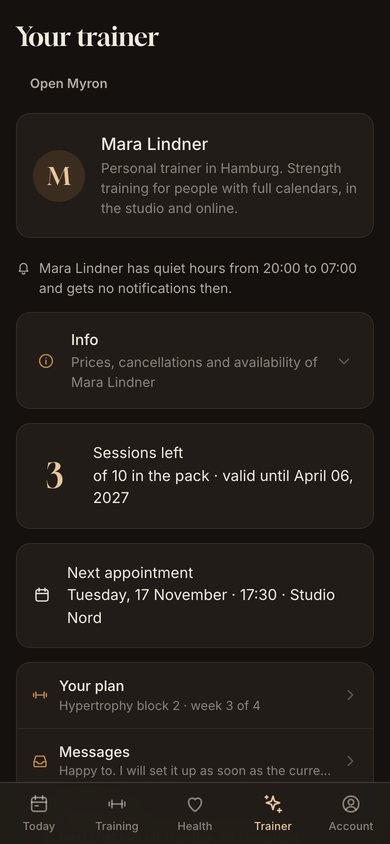
One app instead of three
Many clients today train in one app, count calories in a second and message their trainer in a third. In Myron it is all together. There is no sync between services that has to be set up and then breaks.
- Workouts with a rest timer, supersets and history per exercise
- Nutrition with official nutrition data, barcode, voice and photo
- Weight with trend, progress photos, health data from Apple Health and Health Connect
The “Your trainer” area
As soon as you are connected, your client finds everything from you there: you with your availability and info card, their plan and the session of the day, your messages, the next check-in, the next appointment, their reports and what they share.
On the phone, on the watch, in the browser
Myron is available for iPhone and Android, with apps for Apple Watch and Wear OS, and as a web portal. The session from your plan also runs on the watch, including sections, rounds and rests.
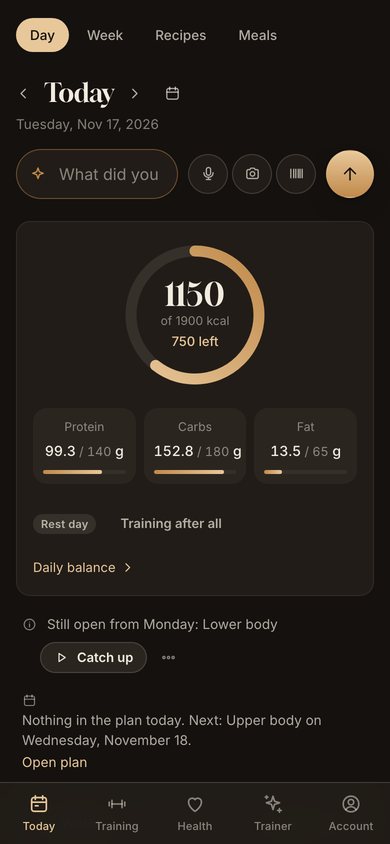
Free for your clients
The plan, messages, check-ins, form check videos, reports and tracking of training and nutrition cost your clients nothing. They can add Myron Premium themselves, but they do not have to. As long as you are connected, they get no promotional notifications for Myron Premium.
Myron Premium is a separate subscription in the app, mainly for unlimited logging by voice and photo and the AI coach. Without Premium, 10 such entries a month are free, and logging by hand and by barcode always works. Premium is not included in Myron Coach. Anyone who wants it buys it themselves in the app.
The data belongs to your client
Your client has their own account. They decide per category what you see and can change that at any time. When you stop working together, they keep their account, their history, their plan, your messages and their reports. The app keeps working, just without you.
What works where
| On the client's side | iPhone and Android (with Apple Watch and Wear OS) and web portal, in German, English, French, Spanish and Italian. Form check videos and check-ins by video or voice only in the apps. |
|---|
Step by step in the handbook
- Invite clientsHow to invite a client by link, QR code or code, what you ask for in the process and what happens when all seats are taken.
- Understand sharingWhich categories a client can share, what read and write access mean, what applies directly and what goes out as a proposal, and what the access log shows.
- What works in which appWhich tasks work in the web workspace, which in trainer mode on phone and tablet, and what your client can do on iPhone, Android, watch and web portal.
Frequently asked questions
Do my clients have to take out a subscription?
No. Everything coaching needs is free for them.
My client already uses Myron. What happens to their data?
Nothing. They keep everything and only give you access. In the shared areas you also see their earlier entries.
Is the app available for Android too?
Yes, in the Google Play Store, including an app for Wear OS. There is also the web portal for any browser.
Can the app carry my logo?
No. Your clients use Myron. Your name is in the “Your trainer” area, on your messages and on the reports.
How old do my clients have to be?
At least 18 years. Connecting with a trainer is blocked for minors.
Goes well with this
- Program builder Training plans in a weekly grid, with the keyboard, history alongside and import from a spreadsheet, PDF or photo.
- Nutrition coaching Macros, calories and protein, photo log or habits. One mode per client.
- Privacy and trust Who sees what, where the data is stored and what the AI receives.
Start with two clients.
The Start tier costs nothing and does not expire. You sign in with Apple or Google, create your workspace and invite your first client.