
Message your clients where their training lives.
One thread per client, in the same app as the plan and the food log. Templates for what you write again and again. And an info card that answers questions about price, location and cancellation rule without you typing in the evening.
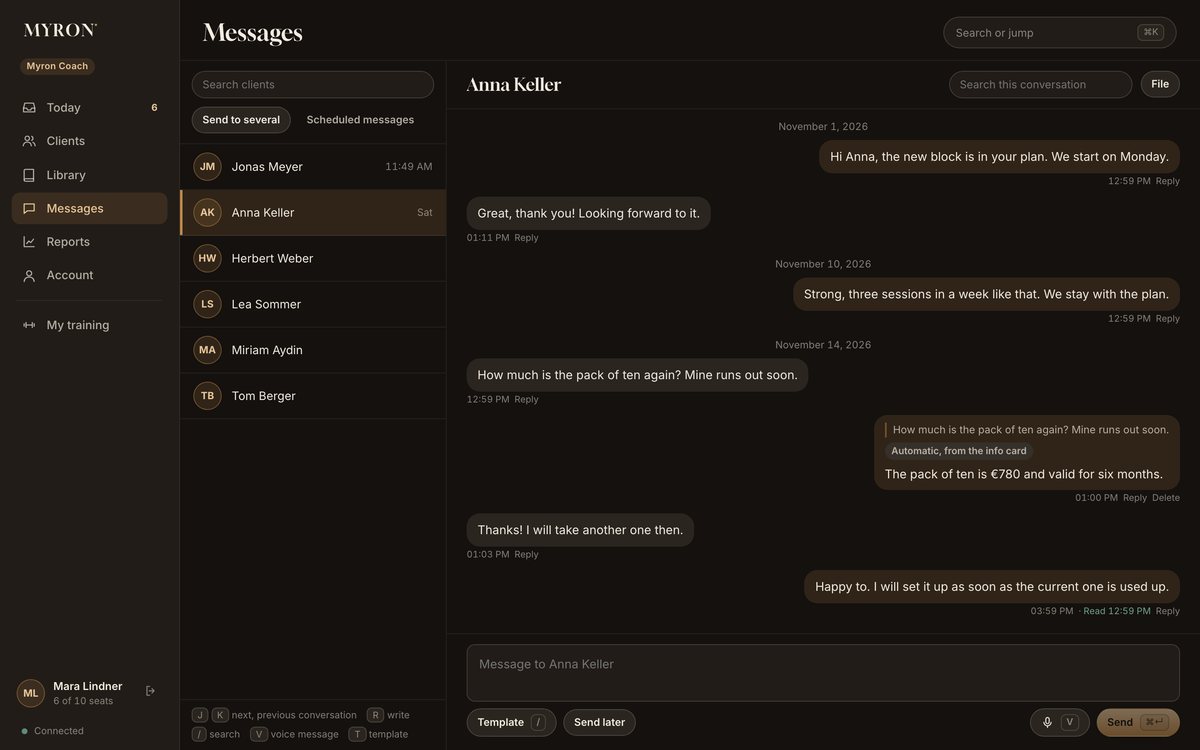
One thread per client
Everything you write to each other is in one conversation: text, photos, voice messages and videos. You can reply to a specific message, search the conversation and see whether your client has read it. In the browser, new messages arrive immediately.
Messages can be attached to a workout or a set. Then they appear there and in the thread.
Templates for recurring messages
A welcome, an appointment reminder, the question about the week: you create up to 50 templates and insert them with a slash while writing. The placeholder for the first name is replaced when you send.
Write now, send later
You can schedule a message up to 90 days ahead. In the browser also to several clients at once, for example “The studio is closed on Friday”. Each one gets it in their own thread.
The info card answers factual questions
Your info card holds prices, cancellation rule, availability, location and frequently asked questions. Your clients see it in the “Your trainer” area.
If you switch on the automatic answers, Myron answers purely factual questions about it right away from the card, for example “How much is the 10-session pack?”. The answer is marked as automatic, you see it in your inbox and can delete it. Myron never answers questions about training, nutrition and well-being. Those land with you.
- Can be switched off, and is off by default
- At most 5 automatic answers per client and day
Quiet hours
You set the times between which you get no notification about new messages. Your client sees that you are not available right now.
What works where
| Workspace in your browser | Send text and voice messages, maintain templates and info card, schedule messages, also to several clients. |
|---|---|
| Trainer mode on your phone | Send text, photo and video, on iPhone also voice messages. Use templates, schedule messages. |
| Trainer mode on your tablet | Same as on the phone. |
| On the client's side | Text and photo on the web. On iPhone also voice message and video, on Android video. |
Step by step in the handbook
- Messages, templates and info cardHow to message clients, create templates, schedule messages and send them to several clients, and how the info card answers factual questions.
- The “Today” inboxWhat lands in the Myron Coach inbox, how you mark items done or set them aside for later and which warnings exist.
Frequently asked questions
Does this replace WhatsApp?
For coaching, yes: messages, photos, voice messages and videos sit with the plan and the food log instead of between private chats. There are no group chats and no calls.
Does the AI answer my clients' questions in my place?
Only if you switch it on, and only factual questions whose answer is written word for word on your info card. Every such answer is marked as automatic. Everything else waits for you.
Can I send voice messages?
Yes, from the browser and from iPhone. On Android, voice messages can currently be neither recorded nor played. The transcript appears there if one exists.
Goes well with this
- Form check video Your client films the set in the app. The video is attached to the set, not lost somewhere in a chat.
- Check-ins Weekly check-ins where your client's week is already next to the answers.
- AI drafts Myron drafts, you decide. What the AI does, what it does not do and how to switch it off.
Start with two clients.
The Start tier costs nothing and does not expire. You sign in with Apple or Google, create your workspace and invite your first client.