
Myron drafts. You decide.
The AI in Myron Coach takes writing work off your hands: it puts drafts in front of you that you change, send or discard. It does not chat with your clients and does not change a plan by itself. If you do not want it, you switch it off.
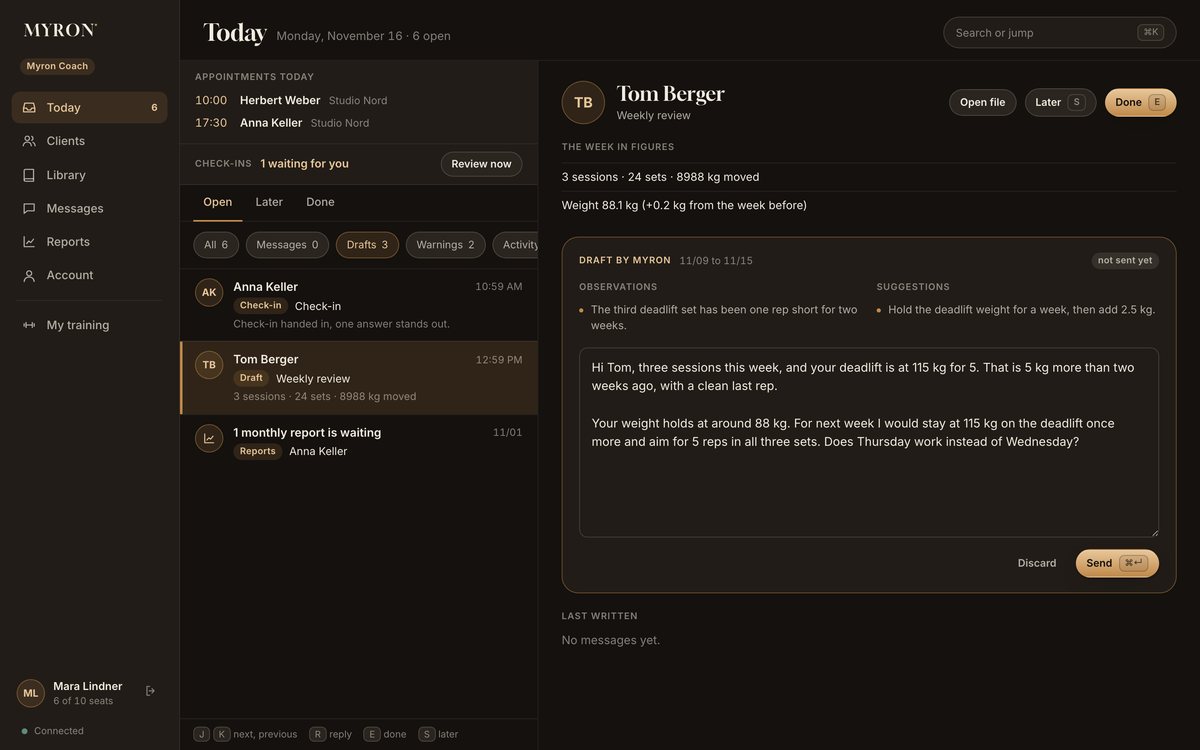
What the AI does
Every feature starts with the data your client has shared with you and ends with a draft on your screen.
| Feature | What you get | Where |
|---|---|---|
| Weekly review | On Mondays a draft per client: what went well, what stands out, what you could suggest | Browser, phone, tablet |
| Reply to a check-in | A draft reply that refers to the answers and the numbers of the week | Browser, phone, tablet |
| Words for the report | A draft for your personal words in the monthly report | Browser, phone, tablet |
| Plan import | A spreadsheet, PDF, photo or text becomes a program in the grid | Browser |
| Program draft | A block of 1 to 16 weeks from your input, as a template | Browser |
| Next week | Suggestions for the next week in the grid, each one can be discarded separately | Browser |
| Question to the client file | An answer with a reference to the data, for example on the history of an exercise | Browser |
| Estimate a photo | Estimated nutrition values of a meal photo, for you only | Browser |
What the AI does not do
These limits are built in. They are not a setting that someone flips by accident.
- It does not send a draft by itself. You send every message to your client.
- It does not change a plan or a goal. Suggestions land in the grid, and you save.
- It does not hold a conversation with your clients. There is no chatbot.
- It does not make diagnoses. It passes pain and complaints on to you as an observation.
- It does not hand out empty praise. A draft names the numbers of the week, and if data is missing, it says so.
The one exception: factual answers
If you switch on the automatic answers, Myron answers questions like “How much is the 10-session pack?” right away from your info card. This is the only place where something goes to a client without you. The answer is marked, is in your inbox and can be deleted. The feature is off at first. More on this under Messages.
Which data goes to the model
For a draft, Myron sends the data it needs to Anthropic, the provider of the language model Claude, based in the USA. The transfer is covered by standard contractual clauses.
Only data from the categories your client has shared with you and their first name are sent. Your private notes, email addresses and other clients’ data are never included. Details are under Privacy and trust.
Switching it off
Under Account, “AI drafts”, you switch off all drafts for your workspace. You then see the week in numbers without text. Programs, check-ins, messages and reports work as before.
The allowance, in plain terms
The weekly review and the first draft reply to a check-in are created by themselves and are not limited. What is limited are the requests you trigger yourself: plan import, program draft, next week, question to the client file, photo estimate and every draft you have rewritten or shortened.
In the Start tier that is 10 requests per calendar month. In a paid tier it is 20 per seat and month, so 200 in tier 10. The limit protects against abuse. In everyday work you will hardly reach it.
If you do not look into your inbox for 14 days, the automatic drafts pause and continue as soon as you are back.
What works where
| Workspace in your browser | All features. |
|---|---|
| Trainer mode on your phone | Weekly review, check-in reply and words for the report. |
| Trainer mode on your tablet | Same as on the phone. |
| On the client's side | Your client does not see any drafts. As long as you set goals or plans for them with write access, the AI coach in their app holds back in that area. |
Step by step in the handbook
Frequently asked questions
Does the AI write to my clients without my knowledge?
No. You send drafts yourself. The only exception is factual answers from your info card, and those only exist if you switch them on.
Can I use Myron Coach entirely without AI?
Yes. A switch in your account turns the drafts off. All other features stay.
Which model is behind it?
Claude by Anthropic. The drafts follow fixed coaching rules set by Myron and refer to the data your client has shared.
Does the AI learn my tone?
For the reply to a check-in, the model gets your most recent messages to this client as an example of your tone. No permanent profile of you is created.
Does the AI cost extra?
No. It is included in every tier, the free one too.
Goes well with this
Start with two clients.
The Start tier costs nothing and does not expire. You sign in with Apple or Google, create your workspace and invite your first client.