
The weekly check-in where the numbers are already there.
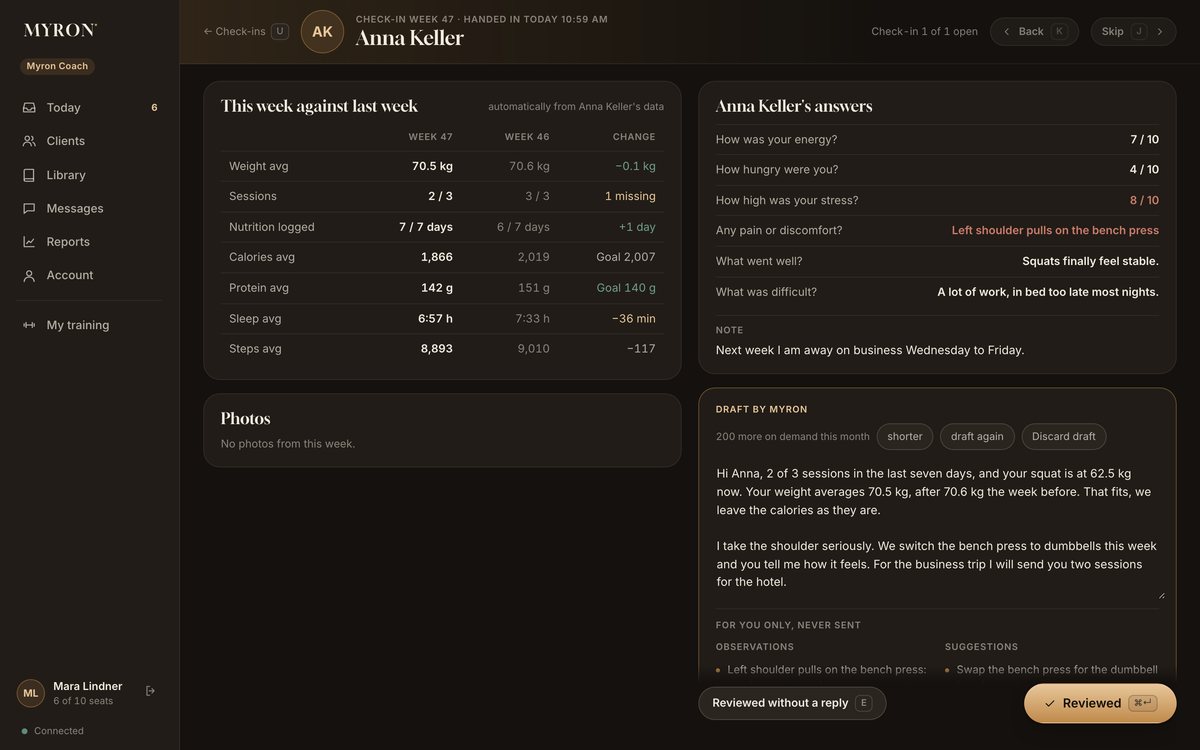
Your client answers a few short questions. Myron puts the weight, workouts, nutrition, sleep and steps of their week next to them. You read, reply and are at the next one with a single key.
Your form, at most 8 questions
A standard form is already set up: energy, hunger, stress, pain, what went well, what was hard. You can change it or build your own forms. Four question types are available: scale from 1 to 10, text, yes or no, number.
For scales and yes or no questions you define from which point an answer stands out. Answers that stand out are flagged in the review, so you do not read past the shoulder that is acting up.
A fixed day, one reminder
For each client you set the weekday and time. The check-in then opens by itself, and your client gets a notification. If they have not answered by the next day, Myron reminds them once. That is all.
The week is already alongside
Next to the answers you see what your client has shared: average weight, sessions, logged nutrition days, sleep, steps and new photos, each against the week before. What they do not share is missing from the table, and Myron says so.
Reply without starting from zero
If the AI drafts are switched on, a draft that refers to the numbers of the week is waiting below the answers. You can have it shortened, have it drafted again, rewrite it or discard it. Only what you send with “Reviewed” goes out. You can also review without a reply.
- Keys:
JandKfor next and previous,Rto reply,Efor reviewed without a reply - For clients without a check-in, Myron drafts a weekly review from the data on Mondays
Video or voice instead of a form
Some people would rather talk than type. In the app for iPhone and Android your client can hand in their check-in as a video of up to 60 seconds or as a voice message. During an appointment you can also fill in the check-in for your client.
What works where
| Workspace in your browser | Build forms, set the rhythm per client, review and answer check-ins, fill them in for the client. |
|---|---|
| Trainer mode on your phone | Review and answer check-ins, fill them in for the client. |
| Trainer mode on your tablet | Same as on the phone. |
| On the client's side | Fill in on the web, on iPhone and Android. As a video or voice message on iPhone and Android. |
Step by step in the handbook
- Set up and answer check-insHow to build a check-in form, switch on the weekly check-in per client, review and answer submitted check-ins or fill one in for the client.
- AI requests and your monthly allowanceWhich drafts Myron writes by itself, which requests you trigger, how many are free per month, what goes to the model and how you switch the AI off.
Frequently asked questions
How often can a check-in take place?
Once a week, on a fixed weekday at a fixed time per client. There are no other rhythms.
How many questions can a check-in have?
At most 8. Short check-ins get filled in, long ones do not.
Does my client see the AI draft?
No. The draft is for you only. Your client gets the reply you send.
Do check-ins work without AI?
Yes. Without AI drafts you see the answers and the week in numbers and write your reply yourself.
Goes well with this
- Messages and info card One thread per client, templates, scheduled messages and a card that answers factual questions.
- AI drafts Myron drafts, you decide. What the AI does, what it does not do and how to switch it off.
- Reports Monthly report, year in review and final report, released by you, with your name.
Start with two clients.
The Start tier costs nothing and does not expire. You sign in with Apple or Google, create your workspace and invite your first client.