
A report that shows what your work together has achieved.
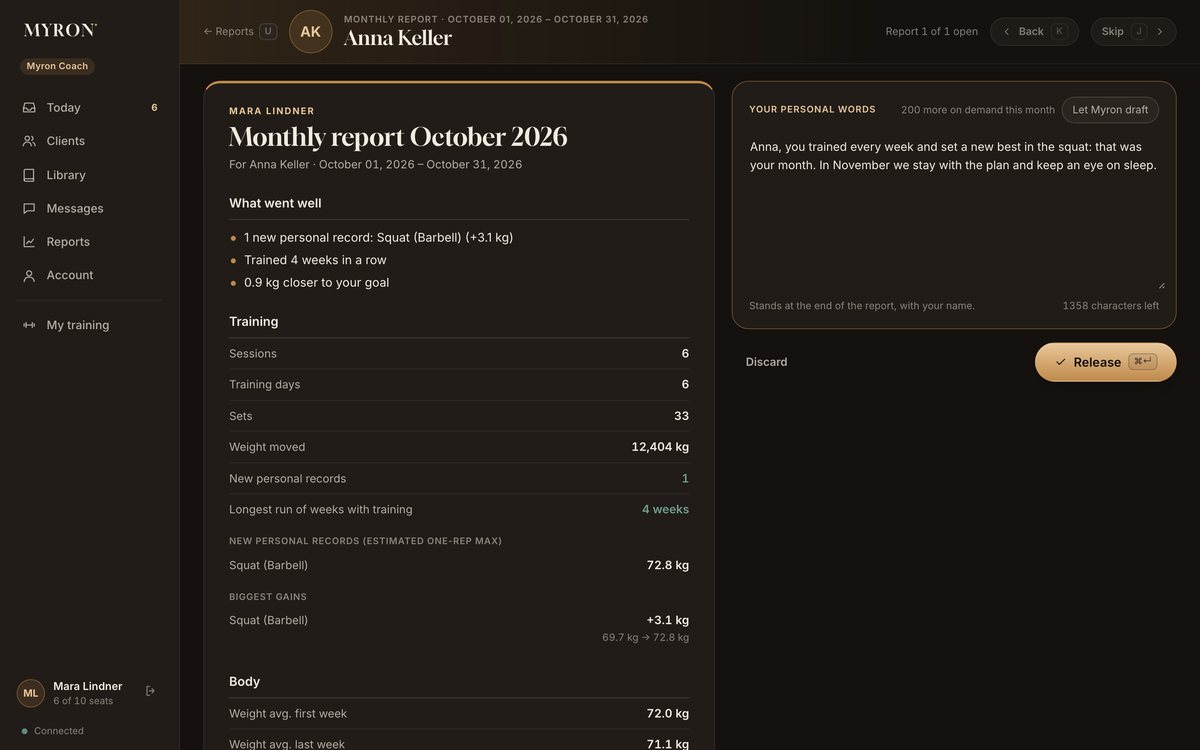
At the start of the month a report is ready for every client: sessions, personal bests, weight, tracking. You add a few personal words and release it. Your client gets it with your name.
Reports that create themselves
The monthly report is created on the first of the month, the year in review in early January or when you ask for it, the final report when you stop working with a client. You can also request the “month so far” at any time, for example before a conversation.
Every report names up to three highlights: a new personal best, a streak of weeks without a gap, the weight closer to the goal. The highlights follow fixed rules and are never negative. A report only contains what your client has shared with you.
You release it
A report waits for you. You add up to 1,500 characters, release it or discard it. If the AI drafts are on, you can have the personal words drafted and rewrite them.
If you do not want that, you switch on “Send reports without release” in your account. Then the reports go out right away without personal words.
On the client's side
Your client finds their reports in the “Your trainer” area, even after you have stopped working together. They can save them as a PDF and share them in the app as an image card. The report carries your name. There is no logo of your own.
Your overview
The overview in “Reports” shows your business in coaching numbers: active clients, how long they have been with you, check-in rate, sessions per week, session packs that are running out and clients who have gone quiet. It does not show revenue, because Myron does not process payments.
What works where
| Workspace in your browser | Review reports, write your words, release, request. Overview. Switch for sending without release. |
|---|---|
| Trainer mode on your phone | Review and release reports, overview. |
| Trainer mode on your tablet | Same as on the phone. |
| On the client's side | View and save as a PDF on the web, on iPhone and Android. Share as an image in the apps. |
Step by step in the handbook
Frequently asked questions
Do I have to write every report myself?
No. Numbers and highlights come from the data. You only add your personal words if you want to.
Can my logo be on the report?
No. The report carries your name. A logo cannot be uploaded.
What happens to the reports when we stop working together?
Your client keeps all released reports. You can still release the final report for 30 days.
Goes well with this
Start with two clients.
The Start tier costs nothing and does not expire. You sign in with Apple or Google, create your workspace and invite your first client.