
For trainers who stand next to their clients.
You train in person, one on one or in a small group. You want to see the values from last time, log quickly and know how many sessions someone has left. For that you need your phone, not a clipboard.
Your day-to-day, as it often looks today
Training values are on paper or in your head. You keep 10-session cards in a spreadsheet, appointments in your calendar, and you notice that a pack is empty at the wrong moment. Many apps for trainers assume that the client logs. With you it is the other way around.
You log, your client trains
In the trainer mode of the Myron app you start the session for your client. Next to every set are their last values. If the equipment is taken, you swap the exercise. The session lands in their account. More on the live session.
- On iPad and Android tablet: two to six clients side by side
- Keeps running offline and syncs later
- On iPhone and iPad also by voice
Session packs, as simple as the paper card
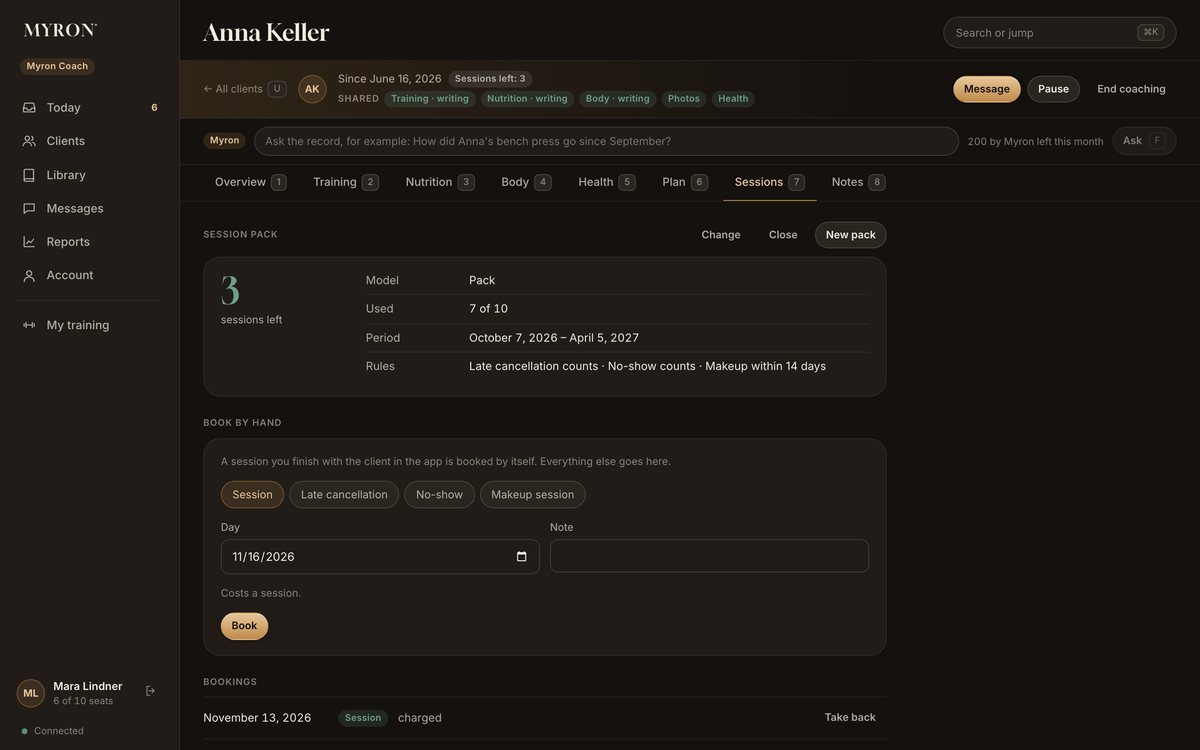
Pack or monthly model, with an expiry date and your rule for late cancellations. A session is deducted when you finish it. Before the last appointment the warning is in your inbox, and your client sees for themselves what is left.
Weekly slots, appointments in your calendar
Every client has their weekly slot. The appointments are on “Today” and, if you subscribe to the address, in your calendar. If something is canceled, your client finds out by notification.
Clients without the app
Not everyone wants an app. Add such a person as a client without the app: you keep the client file and log. If they join later, they take everything over into their own account with a code. When you create the file, you confirm that your client agrees.
And between appointments
If you also give plans for home, you build them in the program builder and see in your inbox whether the training was done. In-person and online run in the same workspace and at the same price.
Step by step in the handbook
- Live session: log in personHow to start a session for your client in the app's trainer mode, enter sets, swap exercises and run a small group on a tablet.
- Appointments and session packsHow to set up session packs and monthly models, book cancellations and makeup sessions, keep weekly slots and subscribe to your appointments in your calendar.
- Manage a client without the appFor clients who do not use Myron themselves: create a client file, log everything yourself and hand the file over to the client later with a code.
Frequently asked questions
Do I need a tablet?
No. For one-on-one training your phone is enough. You only need the tablet for the small group with several clients side by side.
Can Myron Coach bill my clients?
No. Session packs count sessions. Payment keeps running the way you are used to.
Does a client without the app count as a seat?
Yes. Every active client file takes a seat in your tier, with or without the app.
Can clients book appointments themselves?
No. You create weekly slots and single appointments. Your client sees them in their app.
Goes well with this
- Live session and small group You log your client's workout on your phone. On a tablet, up to six clients side by side.
- Program builder Training plans in a weekly grid, with the keyboard, history alongside and import from a spreadsheet, PDF or photo.
- Your clients' app Training, nutrition and watch in one app for iPhone, Android and the web. Free for your clients.
- Pricing Six tiers by active clients. What each one costs and what the free one can do.
Start with two clients.
The Start tier costs nothing and does not expire. You sign in with Apple or Google, create your workspace and invite your first client.