
Your clients come by invitation. Their history they bring themselves.
Myron Coach does not take over a client list from another tool. Every client gets an invitation, creates an account of their own and decides what to share with you. That takes a few minutes per client and settles the data question along the way.
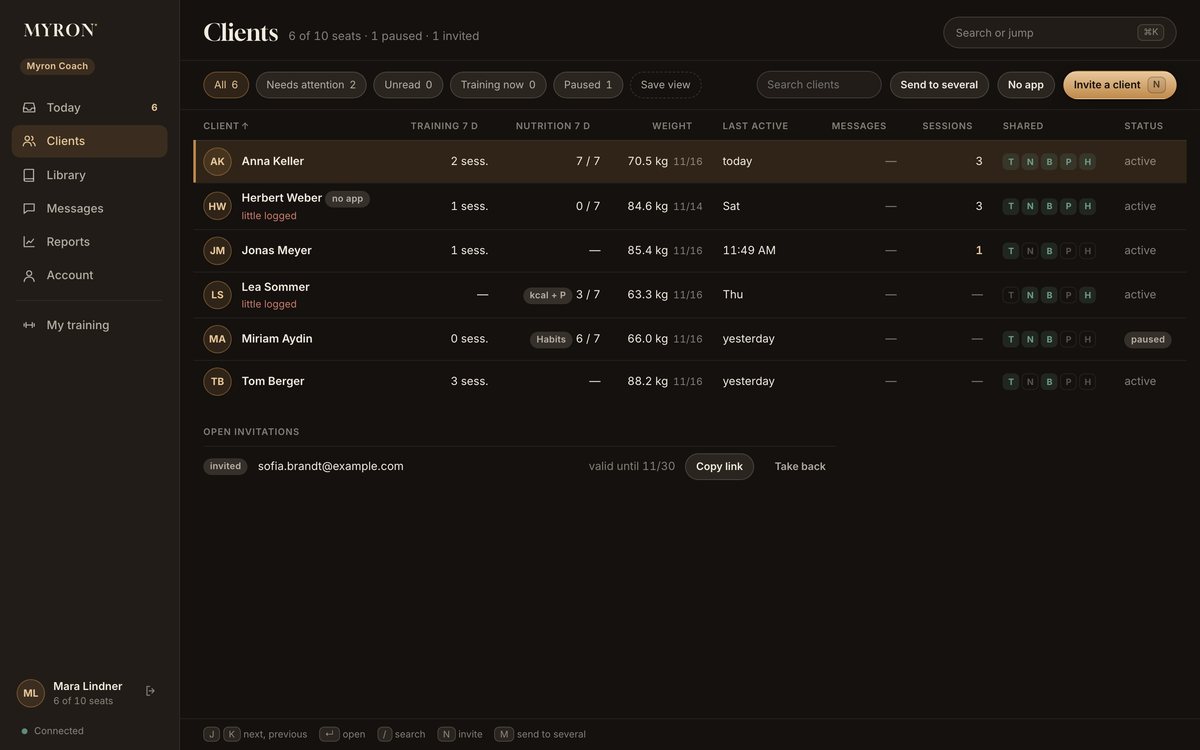
Invite by link, QR code or code
You create an invitation in the browser or in the app’s trainer mode.
- Open the invitation. Go to “Clients” and click “Invite a client”.
- Choose what to ask for. Pick the categories: training, nutrition, body, photos, health.
- Pass it on. You get a link, a QR code and a code of eight characters. Send the link through the channel you two use today, or have the QR code scanned at the gym.
- Your client accepts. They sign in, see your name, choose what to share and confirm.
An invitation is valid for 14 days and works exactly once. You pass the link on yourself, or you enter your client’s email address and Myron sends the invitation in your name. The handbook has the details under Invite clients.
What an invitation costs
Every open invitation takes a seat until it is accepted or withdrawn. The Start tier has 2 seats. To move more clients, take a paid tier or the 30-day trial, which needs no payment details. Your clients pay nothing. They can add Myron Premium themselves but do not have to.
Clients who do not want an app
Not everyone wants an account. For these clients you create a file without the app and enter sessions, weight and nutrition yourself. If your client changes their mind later, they get a code and take everything over into their own account.
Your clients' history
What is stored in your old coaching tool cannot be transferred to Myron. Apps your client logged in themselves are a different matter. They import that history themselves in Myron’s web portal, and you then see it in the client file if they share the category.
- The guides per app are under Switching to Myron.
- The import is free for your client.
| Kind | From which app | Route |
|---|---|---|
| Training | Hevy, Strong, Alpha Progression, GymBook | Export as a file, import in the web portal |
| Nutrition | MyFitnessPal, FDDB, Cronometer | Export as a file, import in the web portal |
| Daily nutrition totals and weight | Yazio, Lifesum | through Apple Health, on the iPhone |
Starting values when there is no history
If no history comes along, the builder has no recent sessions to show next to the cell. After a week or two the column fills up again. Until then, one of two things helps.
- Enter last week’s working weights as the targets of the plan’s first week.
- Or plan the first week with a rep range and RIR, and let the rule “Follows the training” take over the weights. More under Progression.
A message you can send
Keep the announcement short. For example:
“From Monday your plan lives in a new app, Myron. It costs you nothing. Use this link to connect with me and choose which data I can see. Your plan will be under "Today" from Monday. If you track your food, you can do that in the same app from now on.”
Step by step in the handbook
- Invite clientsHow to invite a client by link, QR code or code, what you ask for in the process and what happens when all seats are taken.
- Manage a client without the appFor clients who do not use Myron themselves: create a client file, log everything yourself and hand the file over to the client later with a code.
- Understand sharingWhich categories a client can share, what read and write access mean, what applies directly and what goes out as a proposal, and what the access log shows.
Frequently asked questions
Can I upload a client list?
No. Every client is invited individually, because they have to agree and choose what to share themselves.
Does Myron send the invitation by email?
Yes, if you enter your client’s address. The email comes in your name and carries the link and the code, and no advertising. Without an address you pass on the link, QR code or code yourself.
Do my clients have to pay anything?
No. The plan, messages, check-ins and tracking are free for them. They can add Myron Premium themselves but do not have to.
What if my client already has a Myron account?
Then they accept the invitation with that account. Their existing data stays, and they choose what you see of it.
What do my clients see of me?
Your name, your short description, the plan, your messages and every change you make in their account. More under Privacy and trust.
Goes well with this
- Switching to Myron Coach What you can bring, what you cannot, and the order in which a move disturbs your clients least.
- Import training plans A spreadsheet, PDF, photo or text becomes a draft in the grid. Step by step.
- Your clients' app Training, nutrition and watch in one app for iPhone, Android and the web. Free for your clients.
- Privacy and trust Who sees what, where the data is stored and what the AI receives.
Start with two clients.
The Start tier costs nothing and does not expire. You sign in with Apple or Google, create your workspace and invite your first client.