
Online coaching where Sunday night is yours again.
You coach remotely. Your week consists of plans, check-ins and messages, and most of it is pulling things together. Myron Coach puts your clients' data next to the task instead of into five tools.
Your day-to-day, as it often looks today
The plan is in a spreadsheet, nutrition in a third-party calorie app, the check-in in a form and the rest in a messenger. For every piece of feedback you open four windows. Form check videos disappear between vacation photos, and your client needs a separate login for everything.
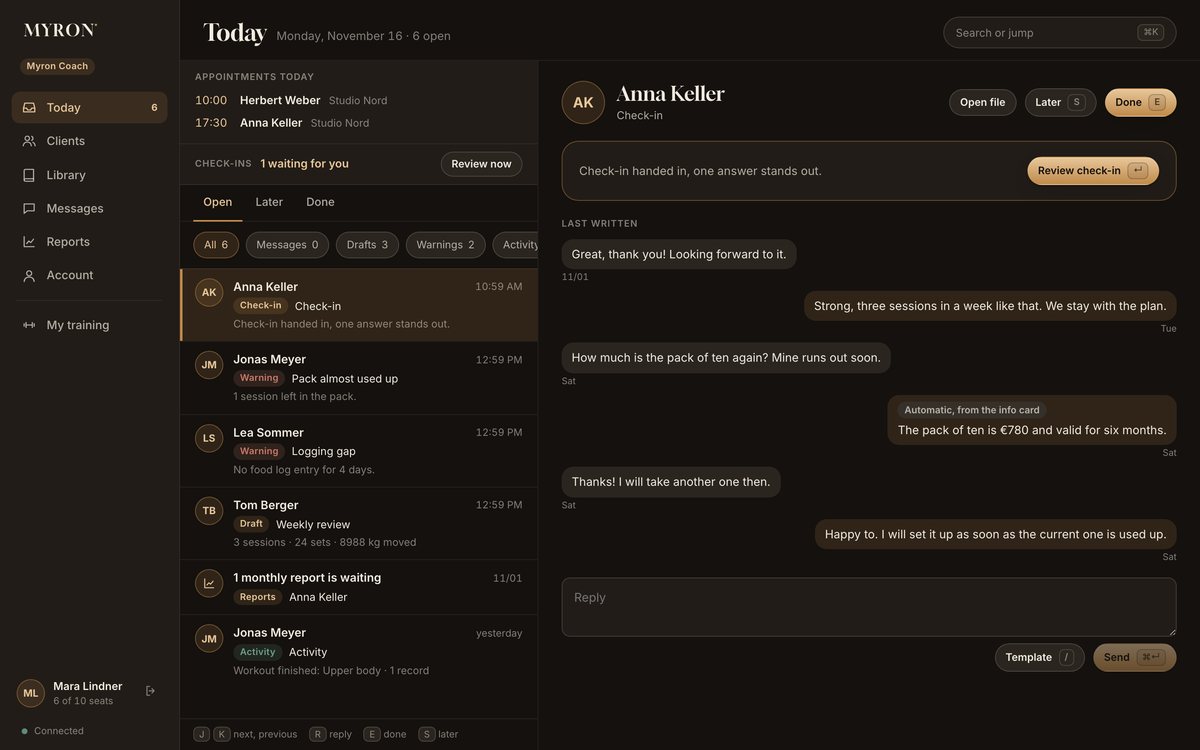
One inbox instead of many lists
“Today” shows in one list what has happened: check-in submitted, workout finished, form check video, message. Plus warnings when someone has not logged for three days or has not trained for a week. You mark every item done or set it aside for later. With J, K and E you go through the list without touching the mouse.
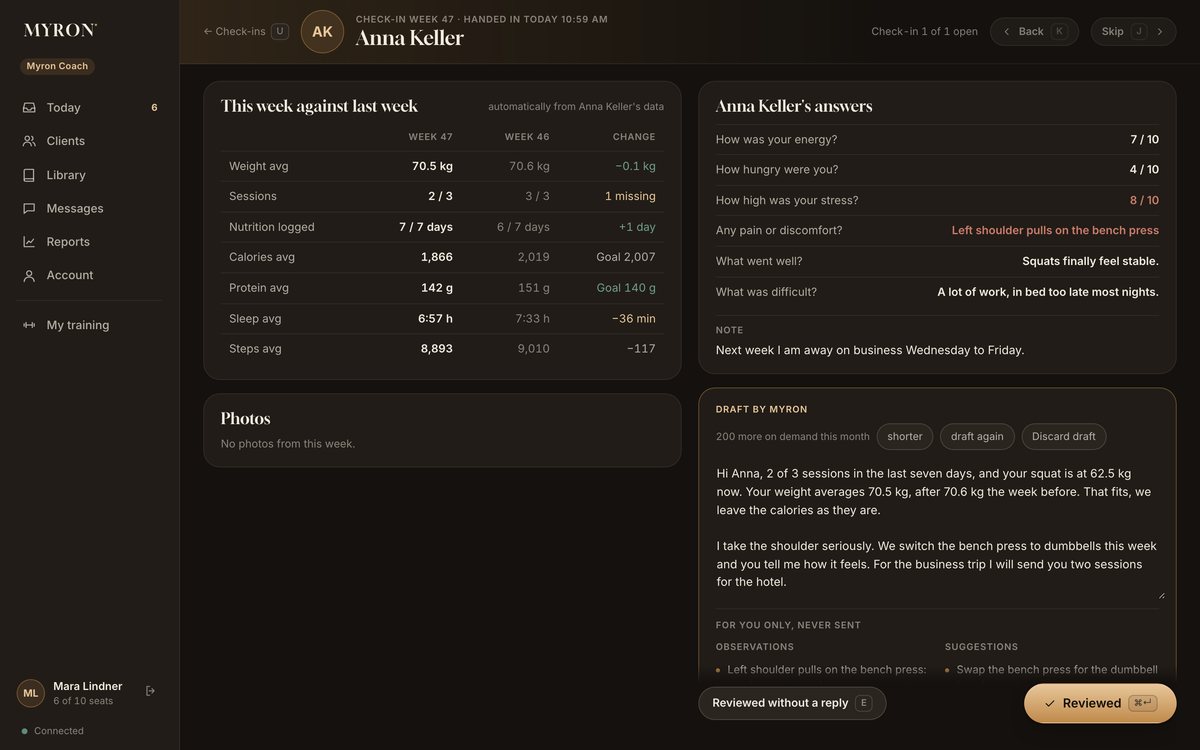
Check-ins with the week alongside
Your client’s check-in comes with their numbers: weight, sessions, nutrition, sleep, steps, against the week before. Below it, if you want, is a draft reply. How check-ins work.
Programs you do not retype every week
In the weekly grid you build a block and keep maintaining it with the keyboard. Progression rules set next week’s weight after every workout. You import your existing plan from a spreadsheet, PDF or photo. See the program builder.
Technique and nutrition without detours
Your client films the exercise on the set, and you see the video with weight and reps next to it. They track their nutrition in the same app, in the mode you choose for them.
- Goals for training days and rest days
- Templates and scheduled messages for recurring things
- A monthly report that shows what your work together has achieved
Step by step in the handbook
- Create your workspaceHow to get started with Myron Coach: sign in, name your workspace, agree to the terms and fill in your profile for clients.
- Invite clientsHow to invite a client by link, QR code or code, what you ask for in the process and what happens when all seats are taken.
- Set up and answer check-insHow to build a check-in form, switch on the weekly check-in per client, review and answer submitted check-ins or fill one in for the client.
- Build and assign a programStep by step: create a training program in the weekly grid, fill cells with shorthand, import an existing plan and assign the program to a client.
Frequently asked questions
Do I need a separate calorie app for online coaching?
No. Your clients’ app is training log and calorie counter in one. You see the food log in the client file if your client shares nutrition.
How many clients can I coach?
Up to 2 for free, up to 100 with a paid tier. Active clients and open invitations count. Paused clients cost nothing.
Can I coach clients in other countries?
Yes. Your clients’ app is available in German, English, French, Spanish and Italian, with nutrition data for those language regions. Your workspace comes in the same five languages.
Goes well with this
- Check-ins Weekly check-ins where your client's week is already next to the answers.
- Program builder Training plans in a weekly grid, with the keyboard, history alongside and import from a spreadsheet, PDF or photo.
- Form check video Your client films the set in the app. The video is attached to the set, not lost somewhere in a chat.
- Nutrition coaching Macros, calories and protein, photo log or habits. One mode per client.
- Pricing Six tiers by active clients. What each one costs and what the free one can do.
- Switching to Myron Coach What you can bring, what you cannot, and the order in which a move disturbs your clients least.
Start with two clients.
The Start tier costs nothing and does not expire. You sign in with Apple or Google, create your workspace and invite your first client.